Best WhatsApp Number Checker
WhatsApp Number Checker
Check and verify WhatsApp numbers instantly with WhatsApp Number Checker
WhatsApp Number Checker helps you quickly check and verify WhatsApp numbers in bulk. With CSV and Excel upload support, clean report exports, and direct operation through WhatsApp Web.
What is WhatsApp Number Checker?
Rather than checking each phone number manually, you can use a WhatsApp Number Checker to verify multiple contacts in bulk. WA-Filter supports bulk WhatsApp number checking, CSV and Excel uploads, and downloadable verification reports, making it an effective solution for lead generation, CRM cleanup, customer database management, and targeted WhatsApp marketing.
With WA-Filter, you can check WhatsApp numbers by country, verify contact lists, filter usable numbers, and generate cleaner databases for your campaigns. By removing inactive, incorrect, or unsupported numbers, the WhatsApp Number Checker helps save valuable time and reduces the chances of sending messages to contacts that cannot be reached on WhatsApp.
Effective Use Cases of WhatsApp Number Checker
Discover how WA-Filter can help you check WhatsApp numbers, clean contact lists, and improve the accuracy of your outreach campaigns.

Generate WhatsApp Leads from Any Country
Create WhatsApp-compatible numbers in bulk based on country or region. This can help you build, test, and validate international contact lists for different markets.

Verify WhatsApp Numbers for Lead Generation
Use the WhatsApp Number Checker to verify contact lists before using them for lead generation. Identify numbers that are available on WhatsApp and separate them from numbers that cannot be reached through WhatsApp.

Avoid Sending Messages to Landlines or Wrong Numbers
Upload your contact list and use WA-Filter to identify invalid numbers, landlines, and unavailable contacts before sending WhatsApp invitations or marketing messages. This helps keep your contact database cleaner and more targeted.
How to use WhatsApp Number Checker: Step-by-step Guide
Step 1: Download the Extension and Activate It
Visit the WA-Filter website and install the Chrome extension. Pin the extension to your Chrome toolbar, open WhatsApp Web, and log in to your WhatsApp account.
Step 2: Check Numbers Manually
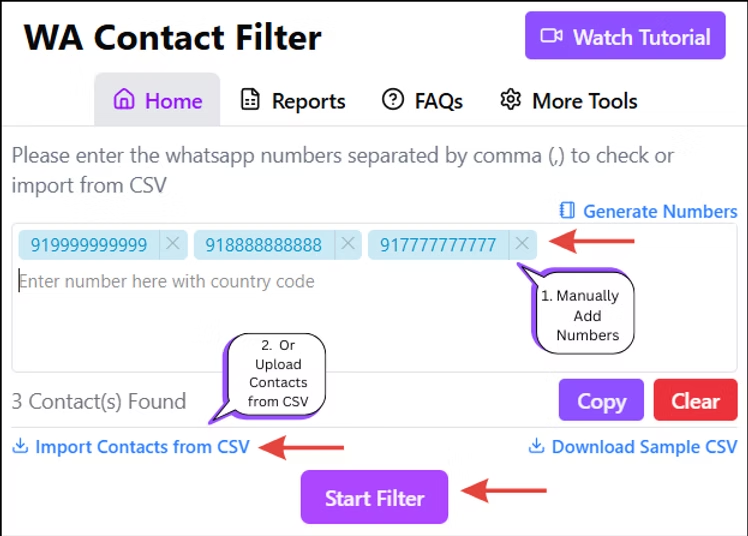
Open the WA-Filter extension and enter the phone numbers you want to check. Click Start Filter to begin the WhatsApp number verification process. After the checking process is completed, download the generated report.
Step 3: Check WhatsApp Numbers Using Excel
For bulk WhatsApp number checking, upload your contacts using a CSV or Excel file. Select the required sheet and phone number column, then click Start Filter. Once processing is complete, download the report containing the checked contacts.
Benefits of using WhatsApp Number Checker
Efficiency: Save time by focusing on contacts that are active on WhatsApp.
Effectiveness: Improve communication effectiveness with targeted outreach.
Reliability: Rely on accurate results provided by the WA-Filter tool.
Features of using WhatsApp Number Checker
Check if a Number is on WhatsApp
Instantly check, filter, and verify WhatsApp contact numbers with fast, accurate, and secure results.
WhatsApp Number Generator
Generate realistic WhatsApp-compatible numbers by country or region for testing, validation, and outreach.
Safe & Secure Verification
Upload CSV files, filter contact lists, and verify WhatsApp numbers without risking unnecessary account activity.
Frequently Asked Questions
What exactly does a WhatsApp Number Checker do?
A WhatsApp Number Checker tells you which phone numbers in your list are registered and active on WhatsApp. You upload your contacts as a CSV or Excel file, the tool runs through each number, and you get a clean downloadable report split into active and inactive numbers. No messages are sent during the process, no manual lookup is needed, and the result is a verified list that is ready to use in any campaign or CRM.
Who should use a WhatsApp Number Checker?
Anyone who sends messages on WhatsApp at scale. Sales teams use it to clean prospect lists before outreach. Digital marketers use it to remove dead numbers from campaign databases. Business owners use it before running WhatsApp broadcast campaigns to make sure every contact is reachable. If you have ever sent a campaign and seen poor delivery rates or wasted credits on invalid numbers, a WhatsApp Number Checker solves that problem at the source.
How accurate are the results from the WhatsApp Number Checker?
WA Filter checks each number directly through WhatsApp Web using your active browser session, the same way a person would look up a contact manually. Because it verifies against WhatsApp’s live data rather than a static database, the results reflect the real-time status of each number. Numbers that are inactive, unregistered, or assigned to non-WhatsApp SIMs are flagged in the report, giving you a verification output you can act on immediately.
How long does it take to check a large list of numbers?
Processing time depends on the size of your list, but WA Filter is built for speed and handles bulk contact lists efficiently. Once you upload your CSV or Excel file and start the filter, the tool works through the numbers automatically without any manual input from you. You can run a check in the background while doing other work and download the completed report when it is ready. For very large lists, breaking them into batches gives you the fastest turnaround.
