Best WhatsApp Number Lookup
WhatsApp Number Lookup
Verify WhatsApp numbers instantly with WhatsApp Number Checker.
WhatsApp Number Verifier instantly validates numbers in bulk, supports CSV/Excel upload, exports clean lists, and runs directly on WhatsApp Web for fast and accurate outreach.
What is WhatsApp Number Lookup?
WhatsApp Number Lookup is a powerful tool designed to filter, check, and verify WhatsApp contacts for businesses and marketers. By using a WhatsApp Number Verifier, you can instantly identify which numbers are active on WhatsApp, ensuring that your campaigns reach real users only. This WhatsApp Number Checker also supports bulk verification, making it ideal for lead generation, CRM cleanup, and targeted outreach. With features like generating numbers by country code, validating contacts in seconds, and exporting clean lists for campaigns, the WhatsApp Number Lookup tool improves accuracy, saves time, and maximizes delivery success.
Effective Use Cases of WhatsApp Number Lookup
Discover how WA Filter can clean your contact list, verify WhatsApp numbers, and improve your campaign accuracy.

Generate WhatsApp Leads from Any Country
Create valid WhatsApp-style numbers in bulk by region to build, test, or validate international lead lists.

Verify WhatsApp Numbers for Lead Generation
Create valid WhatsApp-style numbers in bulk by region to build, test, or validate international lead lists.

Avoid Sending Messages to Landlines or Wrong Numbers
Upload guest lists and let WA Filter remove landlines and invalid numbers before sending invites through WhatsApp.
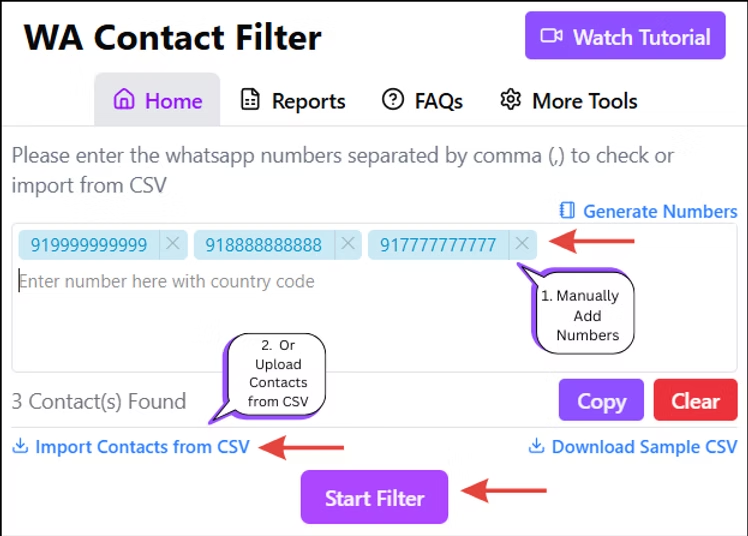
How to use WhatsApp Number Lookup: Step-by-step Guide
Step 1: Download the Extension and Activate It
Visit the WA-Filter website and install the Chrome extension. Pin the extension to your Chrome toolbar, open WhatsApp Web, and log in to your WhatsApp account.
Step 2: Check Numbers Manually
Open the WA-Filter extension and enter the phone numbers you want to check. Click Start Filter to begin the WhatsApp number verification process. After the checking process is completed, download the generated report.
Step 3: Check WhatsApp Numbers Using Excel
For bulk WhatsApp number checking, upload your contacts using a CSV or Excel file. Select the required sheet and phone number column, then click Start Filter. Once processing is complete, download the report containing the checked contacts.
Benefits of using WhatsApp Number Lookup Tool
Efficiency: Save time by focusing on contacts that are active on WhatsApp.
Effectiveness: Improve communication effectiveness with targeted outreach.
Reliability: Rely on accurate results provided by the WA-Filter tool.
Features of WhatsApp Number Lookup Tool
Verify WhatsApp Numbers
Filter, Check and Verify WA Contact Numbers with ease- Fast, Accurate and Secure
WhatsApp Number Generator
Generate real-looking, WhatsApp-compatible numbers by region for outreach, testing, and validation.
No WhatsApp Ban
Import CSV, filter safely, & verify without sending messages- fully compliant and ban-free.
Frequently Asked Questions
How to filter WhatsApp numbers?
Install the WA-Filter Chrome Extension, log into WhatsApp Web, and open the extension. Upload your contact list as a CSV or Excel file, click “Start Filter,” and WA-Filter checks each number against WhatsApp. Once it’s done, download a report showing which numbers are active and which aren’t ready to plug straight into your campaign or CRM.
How to check if a number is on WhatsApp?
A few manual options exist, though they don’t scale well for large lists:
Save the number to your phone’s contacts, open WhatsApp, and see if it shows up.
Send a test message – a single or double grey tick means the number is active.
Add it as a WhatsApp contact and check for a profile photo or “last seen” status.
For anything beyond a handful of numbers, a tool like WA-Filter saves the manual checking and gives you a clean exportable list.
Is the WhatsApp number verification process using WA-Filter secure?
WA-Filter is a secure and privacy-focused WhatsApp Filter Tool designed to filter, check and verify phone numbers without exposing your data.
Simulated Human Operations WA-Filter mimics how a person would check a WhatsApp number on WhatsApp Web. As a whatsapp number checker, it operates through your browser session to avoid triggering anti-spam or anti-bot defenses.
Official API Usage All verifications use WhatsApp’s supported interfaces. By relying on official methods, WA-Filter remains compliant with WhatsApp’s terms of service as a WhatsApp Number Verifier and WhatsApp Number Validator.
Local Processing Your contact list (Excel or CSV) is processed entirely within your browser. WA-Filter Chrome Extension does not upload full lists to external servers, ensuring your bulk whatsapp number lookup tool runs safely and privately.
No Data Storage WA-Filter does not store your uploaded contacts or results after the session ends. You receive a one-time report of valid and invalid entries from the wa filter extension.
No Third-Party Sharing Your data stays on your device. WA-Filter does not share contact details or verification metadata with any external parties.
Best Practices for Secure Use
Install WA-Filter Chrome Extension only from the official Chrome Web Store as the top-rated whatsapp number filter extension.
Review requested permissions before installing.
Keep your browser and WA-Filter updated.
Perform bulk checks over a trusted, private network to check whatsapp number online with confidence.
By following these guidelines, you can rely on WA-Filter as a fast, accurate, and secure WhatsApp Number Checker for all your messaging campaigns.
How much does the WhatsApp number checker cost?
WhatsApp Number Checker pricing plans offered by WA-Filter tool, along with all included features for each:
Personal Plan – ₹499/month (1 User)
Includes:
Filter Unlimited Contacts
Upload Contacts via Excel Sheet
Download Past Filter Reports
Get Lifetime Software Updates
Priority Support over WhatsApp & Email
Personal Plan – ₹1,499/6 months (1 User)
Includes:
Filter Unlimited Contacts
Upload Contacts via Excel Sheet
Download Past Filter Reports
Get Lifetime Software Updates
Priority Support over WhatsApp & Email
Save more over time compared to monthly billing
Personal Plan – ₹2,499/year (1 User)
Includes :
Filter Unlimited Contacts
Upload Contacts via Excel Sheet
Download Past Filter Reports
Get Lifetime Software Updates
Priority Support over WhatsApp & Email
Best value plan for regular users
Frequently Asked Questions
How to filter WhatsApp numbers?
Install the WA-Filter Chrome Extension, log into WhatsApp Web, and open the extension. Upload your contact list as a CSV or Excel file, click “Start Filter,” and WA-Filter checks each number against WhatsApp. Once it’s done, download a report showing which numbers are active and which aren’t ready to plug straight into your campaign or CRM.
How to check if a number is on WhatsApp?
A few manual options exist, though they don’t scale well for large lists:
Save the number to your phone’s contacts, open WhatsApp, and see if it shows up.
Send a test message – a single or double grey tick means the number is active.
Add it as a WhatsApp contact and check for a profile photo or “last seen” status.
For anything beyond a handful of numbers, a tool like WA-Filter saves the manual checking and gives you a clean exportable list.
Is the WhatsApp number verification process using WA-Filter secure?
WA-Filter is a secure and privacy-focused WhatsApp Filter Tool designed to filter, check and verify phone numbers without exposing your data.
Simulated Human Operations WA-Filter mimics how a person would check a WhatsApp number on WhatsApp Web. As a whatsapp number checker, it operates through your browser session to avoid triggering anti-spam or anti-bot defenses.
Official API Usage All verifications use WhatsApp’s supported interfaces. By relying on official methods, WA-Filter remains compliant with WhatsApp’s terms of service as a WhatsApp Number Verifier and WhatsApp Number Validator.
Local Processing Your contact list (Excel or CSV) is processed entirely within your browser. WA-Filter Chrome Extension does not upload full lists to external servers, ensuring your bulk whatsapp number lookup tool runs safely and privately.
No Data Storage WA-Filter does not store your uploaded contacts or results after the session ends. You receive a one-time report of valid and invalid entries from the wa filter extension.
No Third-Party Sharing Your data stays on your device. WA-Filter does not share contact details or verification metadata with any external parties.
How much does the WhatsApp number checker cost?
WhatsApp Number Checker pricing plans offered by WA-Filter tool, along with all included features for each:
Personal Plan – ₹499/month (1 User)
Includes:
Filter Unlimited Contacts
Upload Contacts via Excel Sheet
Download Past Filter Reports
Get Lifetime Software Updates
Priority Support over WhatsApp & Email
Personal Plan – ₹1,499/6 months (1 User)
Includes:
Filter Unlimited Contacts
Upload Contacts via Excel Sheet
Download Past Filter Reports
Get Lifetime Software Updates
Priority Support over WhatsApp & Email
Save more over time compared to monthly billing
Personal Plan – ₹2,499/year (1 User)
Includes :
Filter Unlimited Contacts
Upload Contacts via Excel Sheet
Download Past Filter Reports
Get Lifetime Software Updates
Priority Support over WhatsApp & Email
Best value plan for regular users
