Best WhatsApp Number Verifier & Generator
Make the Best Use of WA-Filter
Create & Validate WhatsApp Numbers Online
You’re 3 steps away from filtering your first WhatsApp list
How to Make the Best Use of WA-Filter? Verify & Generate
How to Filter WhatsApp Numbers Easily?
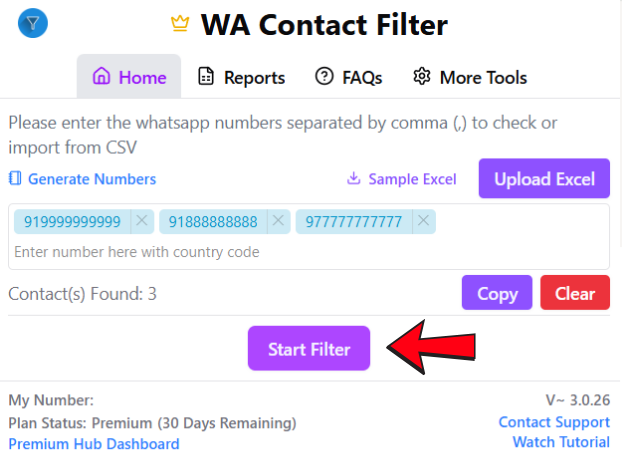
Step 1: Install and Connect Extension
Visit the WA-Filter site, install the Chrome extension, pin it to your toolbar, open WhatsApp Web, and log in to link the extension properly.
Step 2: Verify Numbers Manually
Open the WA-Filter extension, enter the numbers you want to check, and click Start Filter to begin testing. Download the report when done.
Step 3: Verify Numbers via Excel
Upload a CSV/Excel file for bulk checking, choose the right sheet and phone column, click Start Filter, then download the final report.
How to Generate WhatsApp Numbers ?
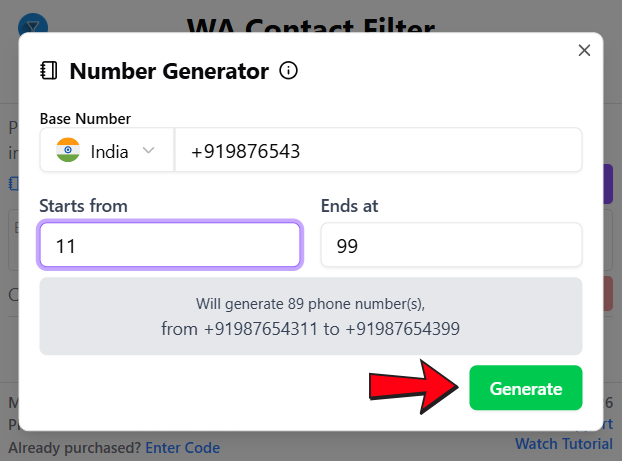
Step 1: Set Up and Select Country
Click “Generate Numbers” to launch the tool, then choose your country code (e.g., +91, +1, +44) to establish the base prefix for your list.
Step 2: Define Base Number Range
Enter a base number missing the last 2–3 digits (e.g., 987654), set your range in “Starts From” and “Ends At”, then click Generate.
Step 3: Generate, Filter, Export
The tool creates valid WhatsApp-compatible numbers instantly, which you can filter and export to verify active contacts in one click.
Why Us?
Why use our extension?
✅ Join 100k+ Premium Hub family with 10+ products
✅ 3 years experience in browser extension development
✅ Avoid the risk of getting banned.
✅ Dedicated Customer Support
Supported browsers
Free Gets You Started. Premium Builds Your Pipeline.
| Feature | Free | Premium |
|---|---|---|
| Numbers per Day | 20 Numbers | Unlimited |
| CSV / Excel Upload | ❌ | ✅ |
| Bulk Filtering | ❌ | ✅ |
| Number Generator | Limited (10/day) | Unlimited |
| Download Results as CSV | ✅ | ✅ |
| Priority Support | ❌ | ✅ |
| Plan Transfer (Change WA Number) | ❌ | ✅ |
| Premium Hub Dashboard Access | ❌ | ✅ |
Frequently Asked Questions
Do I need to keep WhatsApp Web open while filtering?
Yes. WA Filter works through your active WhatsApp Web session. Keep the tab open in the background while filtering runs – you don’t need to watch it.
Can I upload an Excel or CSV file to filter numbers in bulk?
Yes. Click “Upload Excel” inside the extension, select your file, and choose the column that contains phone numbers. WA Filter will read the list automatically and begin checking each number. Once done, your results download as a clean CSV with valid and invalid numbers separated — ready for your next campaign.
Where do I find my filtered results after it's done?
Results auto-download as a CSV file once filtering is complete. You can also view past reports inside the extension under the “Reports” tab
Will my numbers get banned for using this tool?
No. WA Filter checks numbers through your own WhatsApp session, exactly like a normal user would. It does not use bots or third-party servers. No ban risk when used within normal limits.
CHECK OUT MORE TOOLS BY PREMIUM HUB!
WA Filter is one tool in a complete WhatsApp marketing suite. Extract contacts, filter numbers, send bulk messages and backup chats – all from your browser.